How does a demat share transfer work?
To transfer shares between your own demat accounts, first confirm the receiving account’s details and whether you want to keep the sending account open. Then use the sending depository participant’s supported online or paper instruction—or its closure-cum-transfer process if you are shifting the whole account.
Illustrative account map · no sale assumed
The receiving broker’s app is only the destination view. The instruction that debits your existing holding must follow the sending account’s process. That is why a tutorial for one broker may not match the menu, beneficiary approval or authentication method on another.
Keeping the account and transferring selected holdings is different from asking to close it and shift its securities. Decide this before using a normal chargeable transfer workflow.
This guide focuses on shares moving between accounts with the same ownership. A gift, an off-market sale to another person, inheritance and a change in joint holders raise different document and ownership questions. Identify those cases early rather than trying to fit every movement into “transfer to my other broker”.
Four answers before the first instruction.
Write down the sending depository, receiving depository, account-holder pattern and what should happen to the old account. The broker’s brand is useful for finding help, but the depository and account details determine the instruction you need. A familiar app name is not a substitute for checking its Client Master Report.
No account numbers needed. Choose the account setup you want to understand.
Check the CDSL Easiest route.
For an ordinary CDSL-to-CDSL move, ask your sending DP about Easiest access, beneficiary registration and trusted-account approval. A paper DIS remains a route to confirm with the DP.
Read the CDSL steps →Both accounts can use CDSL, both can use NSDL, or the move can cross between them. A cross-depository movement is commonly called an inter-depository transfer. Online availability also depends on the sending DP and the kind of access enabled. Do not assume “online” means the same screen or permissions for every combination.
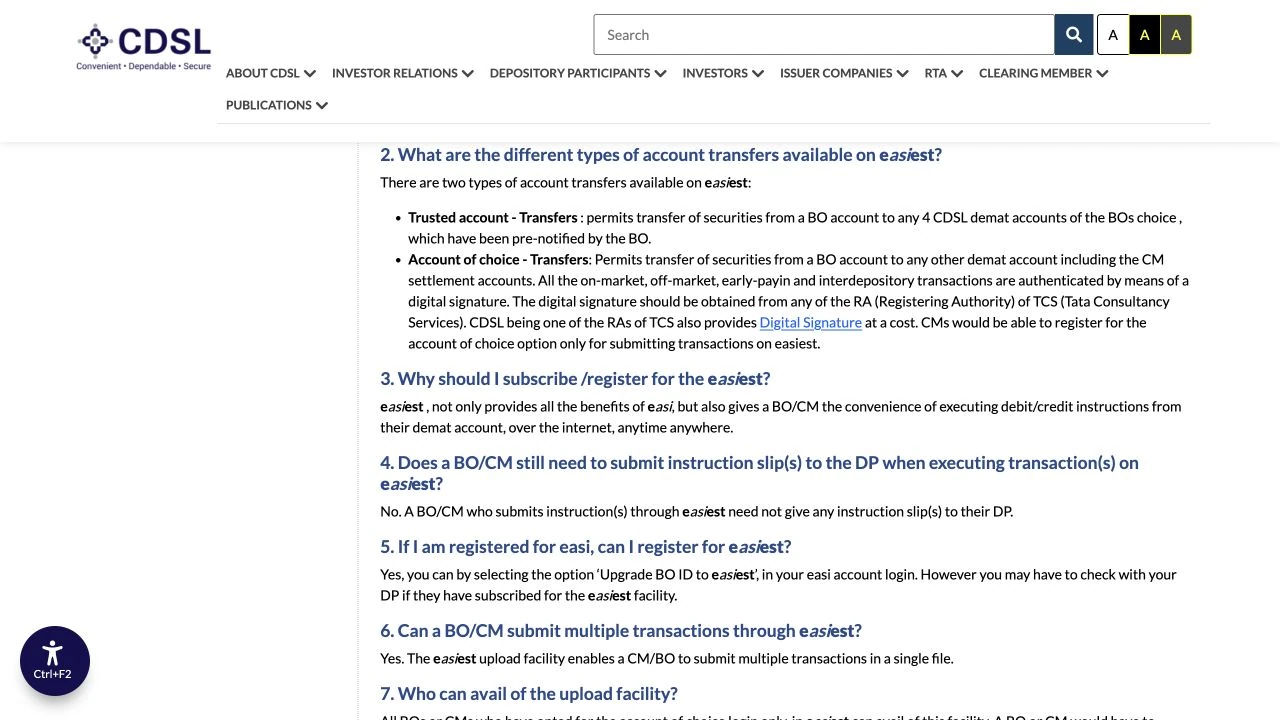
For example, CDSL distinguishes trusted-account transfers from Account of Choice transfers. NSDL distinguishes password-based SPEED-e access from e-token access. These are meaningful permission differences, not interchangeable names for a universal transfer button. CDSL transfer types ↗ · NSDL access modes ↗.
If you are not sure which depository holds an account, ask the DP for the current account record. Resolve that uncertainty before entering a destination. The route finder above organises your next question; the actual instruction belongs in the DP or depository’s official service.
Prepare the destination before the shares.
Obtain the receiving account’s Client Master Report (CMR) from the receiving DP. It is the account-details document used to check the destination and holder names. Keep the signed or digitally signed version required for your process; a cropped screenshot of a profile screen may not meet the sending DP’s document requirements.
Use your DP’s actual document. No real account numbers are shown.
Check the names and their order, not just whether one person appears somewhere on both accounts. A single-holder account and a joint account are not the same ownership pattern. Two joint accounts with the same people in reversed order also need attention before a self-transfer or closure request is prepared.
Next, create a small holdings list: security name, ISIN, quantity to move and quantity available for transfer. The ISIN identifies the security; the ticker is useful for reading but should not be your only reference. Include each security on its own line so you can reconcile it later without guessing from the portfolio’s total value.
Download the records you will want after the move: holdings and transaction statements, purchase contract notes, acquisition dates and costs, plus relevant corporate-action records. Store them before closing access to the old account. A destination balance confirms a quantity; it is not a complete replacement for your historical purchase evidence.
Finally, check for a pending sale, an unsettled purchase, a pledge, a freeze or a lock-in. Ask the sending DP which balances are available for your chosen route. CDSL’s closure guidance treats same-depository and inter-depository shifting differently for restricted balances, so a simple “all shares can move” answer would miss an important condition. CDSL account-shifting requirements ↗.
Online transfer: prepare, authorise, then verify.
For an ordinary CDSL-to-CDSL move while keeping the old account, check whether the sending DP supports CDSL Easiest and which approvals it requires. Easi is associated with viewing account information; Easiest adds instruction capabilities. Being able to see a holding is not proof the account is enabled to send transfer instructions.
- Set up the supported access.
Use the official CDSL route and your sending DP’s instructions for registration or upgrading. Confirm that the enabled account is the one holding the shares, not simply another account under the same email.
- Register the receiving account.
Check the full destination against its CMR. Confirm beneficiary registration and, for the trusted-account route, trusted-account approval. These are preparation steps; entering a new account number does not itself move any securities.
- Prepare the instruction.
Select the security, quantity, destination, execution details and accurate transfer purpose. Reconcile the intended quantity with the available holding. Do not copy a gift or sale reason from a screenshot when moving between your own accounts.
- Review before authorising.
Read the final destination and every ISIN again. Complete the authentication required by the official service. Keep the request reference and check its resulting status; a saved draft is different from a submitted, authorised or completed instruction.
- Confirm debit and credit.
Check the outgoing account record and the receiving holding for the same security and quantity. Only then mark the line complete in your transfer list.
As a documented example, Zerodha’s CDSL guide uses beneficiary and trusted-account preparation before its setup, verification and authorisation steps. It also distinguishes the Easiest PIN from the CDSL TPIN used elsewhere. Use its current support instructions if Zerodha is the sender; do not assume another broker has the same approval sequence. Zerodha’s illustrated online process ↗.
The ordinary trusted-account process described by Zerodha accepts CDSL destinations. Its support page explains a different Account of Choice route for NSDL destinations. Confirm that distinction before trying to enter an NSDL account as a CDSL trusted beneficiary. Destination and trusted-account guidance ↗
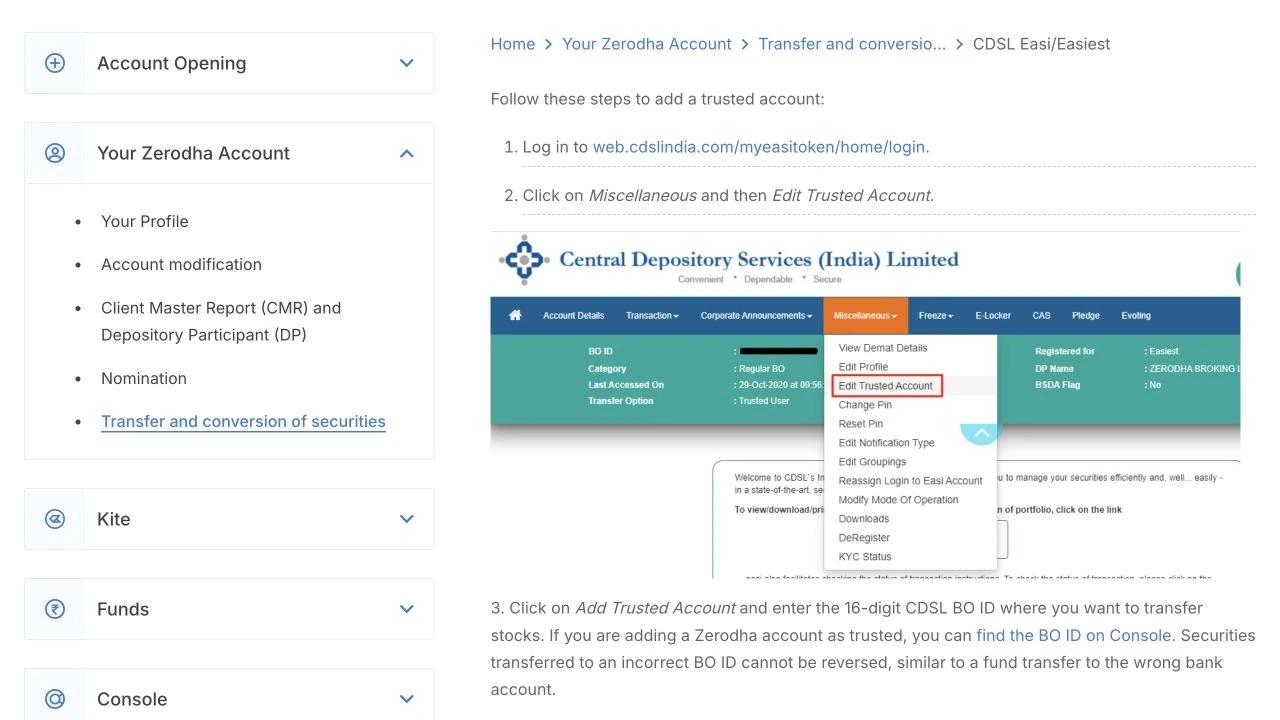
If a request appears to fail after submission, inspect its status and the account records before submitting another. Keep the request number, exact message and time together. This gives the sending DP something concrete to trace and avoids confusing a pending instruction with a second intended movement.
NSDL and cross-depository moves need the right permissions.
If your sending account is with NSDL, ask the sending DP which online or paper process supports your destination. NSDL’s SPEED-e service is available through participating DPs. Its permissions depend on the access mode: the official guidance distinguishes a maximum of six pre-notified clearing-member (broker) destinations for password users from wider transfer capabilities for e-token users, including off-market transfers. A login alone does not establish permission to send to your second personal account. NSDL SPEED-e guidance ↗.
For CDSL-to-NSDL, do not conclude that every transfer must be offline. Equally, do not assume the CDSL trusted-account steps apply. Confirm the supported inter-depository instruction with the sending DP. The field names, authentication and required receiving-account evidence should come from that process.
A paper Delivery Instruction Slip (DIS) is another route to confirm with the sending DP. Obtain its current form and instructions, specify the correct type of movement, and use the destination details from the receiving CMR. Before dispatch, check signatures, the ISIN, quantity and required attachments. Keep a copy and an acknowledgement.
Ask the DP how it accepts corrections and whether any additional verification is needed. Do not reuse an old form simply because its boxes look familiar. A paper request still needs accurate account details and any required beneficiary preparation; paper does not bypass the underlying authorisation checks. Example of a DP’s DIS requirements ↗.
Compare routes by the documents, permissions and follow-up they require. “Online” is convenient when correctly enabled, but the useful outcome is a completed transfer to the right account—not merely getting through a shorter form.
Ask about closure-cum-transfer before paying to move everything.
If the aim is to leave the old account, ask the current DP about closure-cum-transfer or account shifting before initiating an ordinary off-market transfer. It combines the account-closing request with moving the relevant securities to the target account. A regular transfer by itself does not tell the DP to close the old account. For the application, sample letter and completion checks, see how to close a demat account.
Transfer selected holdings
Confirm the ordinary transfer tariff. The account continues and its maintenance terms still matter.
Close + transfer balances
Check eligibility, matching ownership, restricted balances and the DP’s account-shifting documents.
CDSL’s shifting guidance asks for the receiving CMR and a signed account-closure request, with holder names in the same order. For closure and shifting within CDSL, its FAQ allows inactive, locked-in and specified pending demat/remat/destat/restat balances to move with free securities; pledged or debit/credit-frozen ISINs are excluded. For shifting from CDSL to another depository, only free balances move. Do not apply the within-CDSL exception to an inter-depository closure. CDSL shifting guidance, sections 5–6 ↗.
Zerodha’s incoming-transfer guidance distinguishes an ordinary chargeable off-market transfer from qualifying closure-cum-transfer, which it describes as free. That does not make every transfer free, erase existing account dues or turn a different ownership pattern into a self-transfer. Ask the sending DP to identify the applicable route and confirm any outstanding charges separately. Transfer versus closure-cum-transfer ↗.
Get confirmation of both outcomes: the securities have reached the receiving account, and the old demat account is closed when requested. An empty portfolio is not closure evidence. Keep the closing statement and acknowledgement with the transfer records, rather than deleting the old login as soon as the new app shows shares.
“Per security” is different from “per share”.
Read the sending DP’s off-market transfer tariff for the exact route. Do not reuse its delivery-sale DP rate without checking: a sale, an off-market transfer and account shifting can have different tariff treatment. Our DP charges guide explains delivery-sale counting; it is not a tariff for this transfer.
Look for a fee per ISIN, per transaction, a percentage, a minimum or a combination. Then note GST and any separate document or service costs. A rate without its charging unit cannot tell you what a three-security transfer will cost. Ask which charges apply before authorising, and keep the answer with the instruction.
Hypothetical rate, not a broker quote. Same transaction assumption; transfer fees only.
Under this invented tariff, one transaction containing five securities costs 5 × ₹20 × 1.18 = ₹118. Increasing the quantity of one security does not increase the number of ISINs. Splitting instructions could change the bill if the tariff also counts transactions, so retain that part of the wording.
If you keep both accounts, consider their ongoing maintenance schedules as a separate decision. A one-time transfer fee and a recurring account charge answer different questions. Use the demat AMC guide to understand maintenance and BSDA conditions rather than treating a transfer quote as the full cost of holding two accounts.
Asha moves two holdings, then checks three records.
Asha has two single-holder CDSL accounts in her own name. She wants to keep the old account and move 100 shares of Stock A and 40 shares of Stock B. The names, securities and quantities here are illustrative. Neither stock is a recommendation, and the example assumes the specified quantities are available for the selected transfer route.
Hypothetical quantities. Confirm ISINs as well as names.
First she checks the receiving CMR and matches each destination field. Next she completes the sending DP’s supported access and beneficiary steps. She creates instructions for the two ISINs, reviews the quantities and saves the references after authorisation. Keeping the old account is an explicit choice in this example; no closure is implied.
Her first completion check is the debit record: did the intended quantities leave? The second is the receiving account: did those exact ISINs arrive? The third is historical cost: does she still have the original purchase evidence, and does the new broker’s reporting need a manual update?
If the new app initially shows a blank average purchase price, that is a reporting question to investigate separately from the share quantity. Zerodha, for example, explains that transferred holdings can show an unavailable buy average until the acquisition details are updated. A missing average should not be filled with the transfer-day market price just to make the portfolio screen look complete. Receiving-account cost records ↗.
Find the stage, then ask the right question.
There is no useful universal completion promise covering registration, beneficiary approval, authorisation, DP processing and account display. Ask the sending DP for the expected time for your actual route and identify which stage is pending. “My shares have not arrived” is harder to investigate than a request reference with a clear status.
Destination not accepted
Recheck the depository, complete account identifier and enabled transfer mode. An NSDL destination will not fit a CDSL-only trusted-account field.
Beneficiary approval pending
Confirm whether registration and the required approval are complete. Ask the sending DP what is outstanding before repeatedly recreating the beneficiary.
Quantity unavailable
Check pending settlement, sales, pledge, freeze or lock-in status. Ask which balance can move under the selected route.
Debited, not yet visible
Collect the outgoing reference, ISIN and quantity. Ask the receiving DP to trace the credit and distinguish the depository record from an app-display delay.
If you discover a wrong destination, contact the sending DP immediately with the reference and status. Ask whether the instruction is still pending and can be cancelled through its official process. Do not assume a completed transfer can be reversed by changing a screen entry. Zerodha’s trusted-account guidance specifically warns about incorrect destination IDs. Check destination details ↗.
Avoid selling the same shares while a transfer instruction is being processed without first resolving the instruction with the DP. Zerodha’s offline-transfer guidance flags the risk of overlapping sale and transfer instructions. Keep the available quantity and pending movements visible until the account records reconcile. Pending-transfer precautions ↗.
The move is complete when the records agree.
Work down the holdings list you prepared at the start. For each line, compare the ISIN, outgoing quantity, receiving quantity and relevant transaction dates. If only part of a holding moved, record what remains. Do not use a change in the total portfolio value as the transfer check: prices can change while quantities are moving.
- Quantity: the intended shares left one account and reached the other.
- Ownership: the credit is in the intended account and holder pattern.
- History: original purchase dates, costs and supporting documents are retained.
- Charges: the posted debit matches the confirmed tariff and instruction count.
- Account status: the old account stays open or closes as you requested.
For a practical audit trail, save one folder containing the receiving CMR, instruction or closure request, acknowledgement, outgoing statement, incoming statement and relevant fee entry. Add your purchase and corporate-action records. This is more useful than a collection of screenshots with no dates or request references.
Moving between your own accounts should not become an opportunity to rewrite the history of the investment. Keep the original evidence and separate account-reporting adjustments from tax reporting. This guide does not calculate a tax outcome for gifts, sales or changes of ownership; those need their own facts and applicable rules.
“Please confirm the status of request [reference], the debit or credit of [quantity] for [ISIN], and any remaining action. I have attached the relevant statement through your official support channel.”
That message identifies an observable event. It avoids an ambiguous complaint about a portfolio total and gives support a clear starting point. Keep full account numbers and identity documents out of public comments; provide them only where the official process requires them.
Questions worth settling before you submit.
Can I transfer shares without selling them?
Yes, a demat transfer can move securities without an exchange sale. Choose the correct instruction and ownership purpose. Selling and buying again is a different set of transactions, with different price exposure, costs and reporting.
Can I move just some of my shares?
An ordinary transfer can specify securities and quantities, subject to availability and the sending DP’s process. If you also want to close the account, ask about the separate account-shifting requirements rather than assuming a partial move closes it.
Will transferring shares close my old account?
No. Treat closure as a separate requested outcome. If leaving, ask for closure-cum-transfer and retain confirmation that the old account has actually closed.
Is a share-transfer form the same as a demat closure form?
No. A DIS or online transfer instruction authorises a securities movement. A closure request deals with the account, and a closure-cum-transfer process combines the required account and destination details. Use the form supplied for your chosen route.
Do I need the new broker’s login to start?
You need an active receiving account and its correct details. Start by obtaining its CMR, then follow the sending DP’s transfer process. There is no need to give one broker your password or PIN for another service.
Follow the process back to its source.
Checked 18 October 2026. Depository guidance establishes the service and account-shifting distinctions; broker support illustrates the practical requirements of a specific sender or recipient. Screen names, permissions and tariffs should be rechecked when the relevant DP changes its process.
- CDSL Easiest: transfer types and access ↗
- CDSL: account closure and shifting, sections 5–6 ↗
- NSDL SPEED-e: participating DPs and access modes ↗
- Zerodha: CDSL Easiest transfer workflow ↗
- Zerodha: trusted accounts and destination types ↗
- Zerodha: offline DIS requirements ↗
- Zerodha: incoming transfer, closure and acquisition records ↗
The diagrams, hypothetical fee chart and reconciliation example are original explanatory visuals. They use invented holdings and do not display a private account.